


|
Key Features of Manufacturing Software ← go back to features list When it comes to evaluating manufacturing
accounting systems, you can drive yourself batty trying to absorb and make sense
of the enormous amount of features, technologies and rhetoric that you will
encounter during this process. For this reason, we recommend that you start your
evaluation by concentrating your initial review on the following key features: 1.
Vertical Industries – It
is important to realize that there are many different manufacturing industries
out there, each with their own unique needs and way of doing things. Most
manufacturing solutions are designed specifically for one or more of these
industries, but there is no one package that excels in all of these areas. Start
your evaluation by studying the industries (and IC codes) below, and make sure
that the manufacturing accounting systems you are evaluating offer a solution
and references in your particular industry. Most manufacturing accounting
systems
will promote their product as being best suited for a few of these particular
industries.
2.
Manufacturing Methodology – The
various industries listed above can be categorized into a few manufacturing
methodologies. Understanding these methodologies makes it much easier to
understand the various solutions out there. In a manufacturing environment,
companies either manufacture specific items (know as discrete manufacturing), or
they mass produce many of the same item (know as process costing). Then of
course, there are many variations and combinations of these two methodologies.
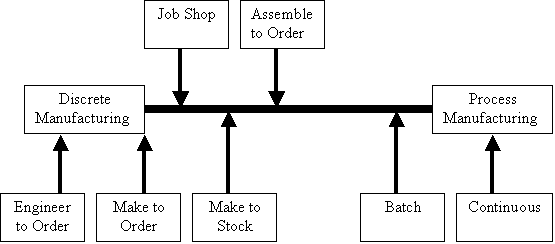
Here is a diagram that may help you better understand the various manufacturing
methodologies:
“Engineered
to Order” item might include the building of a rocket ship nose cone,
which is built to exact engineering specifications. Systems that accommodate
this type of manufacturing typically have a strong interface to a CAD system.
These systems typically have extra fields designed to capture those
exacting engineer specifications, including documentation for testing each
specification along the way as the item is produced. Ultimately, the cost of
producing this item will be reported against the revenue generated – resulting
in more of a job costing or project costing type of scenario. Each customer
order results in a unique set of part numbers, bills of material and routings. “Make
to Order” manufacturing environments tend to involve the assembly of items
with many options. These systems typically have a built-in configurator. A good
example is seen by visiting the COMPAQ Store web page and configurating your own
computer system. You start by selecting the base model, then the RAM, the hard
drive, the CD drive, the sound system, the monitor, etc. A simple system with
five options for model, ram, hard drive, CD drive, and sound produces 3,125
possible combinations. In reality, there are millions of possible combinations
for configurating a single COMPAQ computer. That’s too many SKUs to set up.
Instead, configurators allow the company to set up the options (just 25 separate
options in our example above), and the customer defines the product during the
order process. While this may seem simple, there are complexities that may not
occur to you at first glance. For example, in some cases choosing option B for
the hard drive eliminates options C, D & E of the CD drive. The configurator
must be smart enough to warn and prevent illegal option combinations during the
order process. With this process, the company is not as concerned with measuring
the costs and profit of each individual unit produced, it is more important to
measure the profitability of an entire product line. In this way, this process
has less to do with “job costing” or “project costing” than the
“Engineered to Order” method discussed above. “Assemble
to Order”
– One of the less sophisticated types of manufacturing, assemble to order
shops generally maintain an inventory of parts, and assemble products as needed.
For example, a company may sell gas grills that are unassembled. On occasion,
customers may purchase the unassembled gas grill and put it together themselves.
On other occasions, the customer may pay the company to assemble the gas grill
for them. In this case, the product is assembled to customer specifications
using standard parts after receipt of a customer's order. In many cases, this
type of manufacturing need can be met with less expensive BOMP systems discussed
below. “Make
to Stock” is similar to make to order, except that large quantities are to
be produced. For example, Sony may produce 500,000 units of a certain
dinosaur-shaped radio/telephone system. What’s different here is that even
though the company is producing identical items, the options may change
mid-stream. For example, a buyer may find a better and less expensive chip in
Taiwan, replacing it for the current chip that has been used up to this point.
In other words, this system allows the company to produce identical items that
are actually different. Yet, the resulting items are treated as being identical
for inventory purposes. Further, make to stock is easier to accomplish in that
there is no need to match the specific item with a specific customer. Under the
Make to order methodology, the item being produced had to be identified to the
specific person who configured that order. With make to stock, there is no need
to go to this length as the item is simply intended for the shelf. Typically,
the products are standard items with volumes of production based on expected
demand. “Job
Shop” manufacturing situations usually are found in plants with a great
deal of equipment is used to manufacture a wide variety of goods that follows a
distinct routing through the shop. The job shop method is typically used to
track the production of larger quantities of goods. For example, a customer may
order 50,000 square yards of fabric with pictures of their company logo printed
thereon. The fabric is made at one station using the raw materials specified,
then the fabric moves on to the dye station where it is dyed to color. Next the
company logo is printed on the fabric at another station and finally the fabric
is cut to size at the final station. In this case, the manufacturing company
wants to keep track of the machine time used at each station and allocate a
standard cost to that particular job based on the total time. Further, the
manufacturing company wants the system to track the flow of the fabric through
the plant so that managers can see where the order is in the production cycle
from their desktop. This will allow the production manager to keep the fabric
moving through the plant in the desired time frame, and report back to the
customer an expected time when the order will be completed. Process
Manufacturing
environments are different. Rather than producing individual items, the company
produces bulk quantities of an item such as a chemical product, food products,
etc. For example, consider a company that produces hot dogs. In this case, no
attempt is made to match a particular hot dog with a specific SKU or a
particular customer for that matter. Hot dogs are simply churned out all day
long. Recall that “Make to Order” items must be matched with their owners
throughout the manufacturing process. With process manufacturing, the emphasis
is on capturing plant costs and raw material costs and properly allocating those
costs to the hot dogs. The company is usually more concerned with productivity
over a period of time rather than for a given quantity of items. In our example,
the President of the hot dog company would be more likely to report that March
profits amounted to $450,000, compared to just $225,000 in March last year
rather than emphasizing the profit percentage per hot dog in march this year
(32.763%) compared to last year (32.124%). Batch
Process Manufacturing
is more demanding than regular Process Manufacturing because these companies
tend to shift gears from the production of a single product to the production of
multiple products using the same plant facilities. In general, parts are
accumulated and products are processed together in a lot. In this scenario, the
company needs accurate capacity planning and materials requirement planning
capabilities to aid the process of ordering raw materials. For example a beer
company may use a single brewery to produce five different brands of beer.
Because the same facilities are used to produce multiple products, it is very
important for the company to project the demand for raw materials on a precise
calendar. Receiving raw materials too early could result in storage problems
whereas receiving raw materials too late could hold up production. In this
example not only is forecasting demand important, but the company must also be
able to forecast the usage of raw materials to be used in that process. 3.
Bill of Material Processing (BOMP) – BOMP is also known as “Kitting”,
“Assembly”, or even “Light Manufacturing”. Regardless of
the name, it is very important for you to understand exactly what Bill of
Material Processing is all about. Many companies who claim to manufacture goods,
actually do not really manufacture goods. Instead, they simply bundle separate
goods in different ways and in this case, a solid BOMP system may be all they
really need. To illustrate this concept, lets use the following example:
Consider a company that produces a wide variety of training materials for
nurses. This company may produce brochures, booklets, manuals, and self-study
courses on dozens of topics at the basic, intermediate, or advanced level. The
company may also sell training videos, bandage kits, resuscitation dummies, and
more. However, rather than selling these items individually, the company groups
(or assembles) these items together into many different bundles (or kits), and
sells them under various names. For example, two such kits might be “Basic
Bandage Training” or “Shoulder Therapy Techniques”. The first kit might
contain 4 brochures, two spools of bandage, and a training video. The second kit
might contain a manual, two training videos, a rubber exercise band, and a wall
chart detailing the shoulder’s muscles and skeleton. These resulting bundles
probably sell for a lower price than the sum of the pieces. Some companies refer
to this process as manufacturing, or they might assume they need a manufacturing
solution in this situation. This can be a costly mistake. Most products deliver
strong BOMP processes, however advanced manufacturing solutions are only found
in more sophisticated solutions and they will cost much more. Another
way to detect the difference between the need for a basic BOMP solution and the
need for an advanced manufacturing solution is to consider the need to track the
cost of labor and machine time related to the production process. In our example
above, the company probably does not feel a tremendous need to meticulously
track the cost of labor for bundling the items together or the cost of the
machinery used in this process (shrink wrap machine, labeling machine, etc.)
These costs are probably just overhead costs accounted for on a separate line
item on the financial statement called overhead. By contrast, in a true
manufacturing environment, much attention is paid to tracking labor and machine
time, often down to the minute, and then allocating those specific costs back to
the product or products produced. Such costs may even include set up and tear
down time for preparing and cleaning machinery before and after the
manufacturing process. The
reason it is important for you to recognize a BOMP situation, is because there
are many good lower cost BOMP solutions out there such as MAS 90, Dynamics,
ACCPAC, BusinessWorks and yes, even Peachtree Complete Accounting. You or your
client may be able to meet your needs perfectly with one of these lower cost
solutions. However, if you truly need a manufacturing solution, then you will
need to step up your evaluation to include more sophisticated products such as
Syspro Impact Encore, Microsoft Axapta, e by Epicor, Microsoft eEnterprise, Macola
Progression, etc. yes, these higher end products would provide excellent BOMP
capabilities. However these solutions would cost more and would typically be
more complex to use. It
is also important to understand the concept of multiple levels of BOMP. What
this refers to is the situation in which assembled items are themselves items to
be included in a larger assembled item. For example, a carburetor may be an
assembled item – identified as a BOMP item. However, the carburetor is also
part of a larger assembled item – the engine. In turn, the engine is an
assembled item – the lawn mower. In this example, we have three levels of
BOMP. This is important because manufacturers need to manage these interim items
– sometimes called phantom items. For example there may be a manager in charge
of carburetors who manages the planning, storage, packaging, and usage of these
particular components. Key
Manufacturing Features –
as you evaluate manufacturing accounting systems, you will encounter hundreds of
features. However, the following list represents the most important features
that you should consider during your evaluation: a. Configurator
– the configurator is a key feature that separates the “contenders” from
the “pretenders’. The
configurator allows the user to set up a single item, complete with dozens, if
not hundreds of options. For example a customer may order a Cadillac Deville and
the options may include heated seats, side airbags, sun roof, 16-speaker stereo
upgrade, Northstar engine, etc. – you get the picture. The configurator then
allows sales representatives (or even customers via the web) order the product
with exactly options they want. The resulting configured order is linked to the
customer name, address, phone, etc. The configurator itself also uses rules
which can be defined to prevent illegal combinations of options. For example, if
the customer adds the built-in ceiling television to their Cadillac, then the
sunroof is no longer a legal option. b. Factory
Planning - Factory Planning
systems assists users in planning workload against available capacity. Capacity
is derived from the number of available machines and its working hours. Load is
calculated using the standard structures and routes provided by our ERP system. c. Station
Scheduling - Station
scheduling systems allow each manufacturing work station to be scheduled
independently with user-defined rules for optimizing and viewing work in the
station. Gantt charts show a time-based view of scheduled operations for the
machines in each particular station. Additional
requirements for resources such as operators, setters and tools should be shown
in parallel with the Gantt chart when calculating the schedule. Some systems
(such as Syspro Impact Encore) provide a “live” Gantt chart with
"drag-and-drop" capabilities for moving jobs in time and between
compatible machines. Should changes in demand or resources occur, they can be
immediately reflected in the schedule. The
schedules are in real-time with progress constantly reported from the shop floor
so issues can be resolved immediately. d. Progress
Tracking – The better
manufacturing systems provide progress tracking capabilities which typically
depict a graphical shop floor application and supplies operators with current
work-to list. These systems should
also supply a list of required materials and any text or diagrams associated
with each job. Many of these systems support touch-screen monitors for easy data
entry. Using the touch screen, jobs may be started, stopped, or completed
(wholly or in part). Scrap can be recorded and additional operators booked to
them as necessary. e. Lot
Tracing - The ideal time and
place to record which lots of material were used to manufacture products is on
the shop floor as they are consumed. A good system will allow materials to be
recorded against an individual machine or multiple machines. Currently running
jobs should have the appropriate lots recorded against them. f. Quality
Monitoring – A good
manufacturing system should offer the built-in ability to integrate the
recording of quality parameters with the recording of progress data. Quality
data items to be recorded are typically user-defined and may be related to a
machine, product, customer, or collected upon manual selection. The collected
data should be stored in a database that can later be queried directly or via
analysis tools. For example, assume a company has five similar machines
producing metal pipes. As pipes are produced, workers at each machine measures
and weighs each pipe at regular intervals – the system ties those measurements
to the specific machine, worker, and time. Later, management imports this data
and analyzes it to find that four of the five machines are producing pipes
within acceptable limits of the desired measurements and weight. However, it is
determined that the pipes being produced by the fifth machine are far too heavy.
This allows the company to remove defective goods from the production line as
quickly as possible. It also allows the company to identify where the particular
problems may lie. In this example, machine five is producing pipe that is too
think, too heavy, and defective because the machine’s cutting blade has
broken. Armed with this information, the company can isolate and correct the
problem, and get the machine back on line. The most powerful of manufacturing
systems will utilize automated checks at regular intervals for trends and
"blips" in the collected data – and the system can be configured to
send warnings to other users when processes are getting out of the tolerance
range. g. Standard
Costing - While most non-manufacturing systems typically base costs solely
upon purchase costs, manufacturing costing can become quite complicated. The
calculated cost of an item or subassembly needs to be fixed for a period of time
so that it can be used to calculate margins and act as the source for
productivity analysis, but costs need to be reevaluated on a regular basis. A
good manufacturing system will regenerate the standard costs either
automatically, or when the users decide that the costs need to be reevaluated
for particular items. h. Group
Work Centers into Cells - A Work Center might be a single machine. However
that machine does not really operate individually, but in concert with other
machines. Here it would be logical to group all of the machines into what might
be called a cell for costing and planning purposes, particularly if the natural
management of the cell follows a similar pattern (i.e. they are managed by a
supervisor). i.
Scheduling Systems - There are several ways to look at scheduling.
It could be based upon an assumption that there are no constraints, in which
case jobs are scheduled as they become available. Alternately, the required
completion date of the job could be taken into consideration, in which case the
required start date for each operation is based upon the required completion
date(s) further down the line. Here scheduling works backward from completion
date to start date. Some people would prefer to exercise some degree or complete
control of the scheduling process (manual). Finally, scheduling may be based
upon a combination of a forward and backward analysis where potential
bottlenecks are identified. j. Lead
Time Tracking - If jobs are to be completed in a timely manner, manual or
computer-assisted planning systems have to take into consideration lead times as
well as actual production times. Setup and production times are easily
understood. Queues are backups normally associated with specific pieces of
machinery. Wait time may be thought of as the time when no work is performed on
a job between operations. It may be travel time to get from one machine or work
station to another, or it could be due to any other expected delay that is not
directly associated with a machine or operation (like setup and queues). k.
Outside Processing - Many manufacturing facilities rely upon
outside contactors to perform certain functions. It could be applying special
coatings to parts, or any other operation, and it could come at any point in the
production cycle. In some cases an item could be partially manufactured
in-house, then sent to the outside partner for a particular operation, and
finally placed back into production in-house. In these cases the planning and
control functions have to recognize that the outside processing operations are a
critical link in the manufacturing process. Although users may not have direct
control of the outside partners production cycle, those processes have to be
taken into consideration and controlled as closely as practical. l.
Just in Time Planning - Just in time production control techniques
cut lead times dramatically so that inventory arrives from the manufacturer as
it is needed on the shop floor. This reduces the need for stocking material
drastically, and increases working capital significantly. This question tries to
identify the degree to which the system supports just in time production
planning. m.
Shop Packets - Bills of Materials describe the material and other
resources for an entire job, but many people prefer to break the Bill of
Materials into discrete packets of printed information relating to each
operation or work center. These shop packets are like mini Bills of Material
designed specifically for the work to be performed in each operation of work
center. n. Alternate
Operations - Alternate operations allow managers to schedule specific steps
either before or after other operations. The order does not make any difference,
so that rather than waiting in line to complete one operation, managers can
schedule another operation and then schedule the first one when the machinery or
manpower is available. o.
Overlapping Operations - Overlapping operations are processes that
can start before the previous step is completed. They are not simultaneous,
because one operation has to start first, but the second one can start before
the first one has been completed. p. Serial/Lot
Tracking - Serial and lot tracking are important in many instances. Only the
serial number of the finished item may be important (single level), or all
serial numbers of components may be important (multi-level). Finally, the lot
numbers may be important. q. Lot
Splitting - In most cases a lot has to be processed in a single operation to
ensure consistency in the manufacturing process. However, in other cases the
operation can be split into segments where part of the lot is processed at one
time, and the rest at a later time. r. Backflushing
- There are two ways to look at when components are officially used. Once a
sub-assembly is completed, the system could deduct all components from
inventory. Alternately the components would not be officially withdrawn from
inventory until the work order is completed. s. CAD
Integration – Used
particularly in engineered to order situations, this feature integrates the
measurements contained in an engineer’s drawing (in AutoCAD for example) to be
linked to the machine instructions in the manufacturing system. In this manner,
when the engineer changes a specification on an drawing, that change is
automatically reflected in the plant through instructors and or machine
specifications. t. Maintenance Management – An important feature found in manufacturing systems is a maintenance system which manages the schedule for maintaining the plant equipment. These systems contain rules that allow management to schedule maintenance routines for each piece of equipment, and properly shows the unavailability of these pieces of equipment from the floor during maintenance periods. - END - |