|
ACCPAC
The ACCPAC offers a total solution for Warehouse Management
using a Web and handheld device-based solution for SMB's. The software is
fully integrated with ACCPAC Advantage Series and ACCPAC Pro Series
accounting systems and other ACCPAC end-to-end business management
applications. ACCPAC WMS improves inventory control, reduces paperwork,
increases stock handling efficiency and accuracy, and provides
customer-facing employees with an up-to-date window on warehouse operations
that significantly improves customer relations. Some of the modules
that are included in the system are:
-
Kitting features - the process of picking, packing and shipping a product is
tracked in a single stock-keeping unit (SKU).
-
Serialized Inventory Control - provides attribute control and serial number
support for serial stock-move operations and validation. -
LTL Bills of Lading Manifest Tracking - this feature is useful for companies
who frequently ship partial loads. It allows for Less than Truck Load
(LTL) quantities in the bills of lading manifests. -
Inventory Management Tools - replenishment features to manage reallocation
and replenishment of inventory with visibility of unallocated inventory in
real-time. -
Picking Processes ("Supermarket Picking") - fill multiple orders
simultaneously. -
Security Features - advanced permission configurations. -
Competitive Pricing - starting at an SRP of $30,000 (USD).

The ACCPAC WMS production entry provides a bill of materials, as well as
sales kits and configurations.
Axapta
top
There are several aspects
of Axapta software that make it stand out in the crowd. Axapta is very
powerful with a deep set of features. Microsoft Axapta has developed a
reputation for being extremely powerful with a deep set of great features
and customization capabilities. To give you an idea of how sophisticated the
system is, you need only look at the extensive capabilities of each module.
For example, the warehouse module allows you to set up multiple warehouses,
the number of aisles in each warehouse; areas for primary storage, buffer
storage, and picking locations; the number of shelves on each isle; the
height, depth, and width of each self, outbound and inbound docks, etc.
Axapta also asks the user to define all forklifts including the forklift's
function such as whether it is equipped to move pallets, pipes or other
materials. Users can even schedule blocking causes where it is known in
advance that a particular aisle will be blocked temporarily for various
reasons such as restocking. All of these factors are then used by Axapta to
recommend where products should be stored, what order items should be
picked, when items should be picked, etc. It is very impressive, not to
mention complex. Axapta has advanced features that position it at the high
end of the mid-market. Shown below is a customer revenue pivot table
created for on Axapta customer.
Axapta is also an extremely fast product, and includes many other features
including:
-
Low Cost
- Even though Axapta has the power and functionality of
a Tier 1 ERP product, it is priced very reasonably. A typical 10 user
implementation of Axapta will generally price out at $80,000 to $120,000
for the software, and approximately $150,000 for a 50-user implementation.
-
Customization -
Like it's twin cousin
Navision, Axapta is highly customizable - even more so than Navision.
Axapta has a unique feature in which newly created customized fields are
assigned to a category. With this assignment, the newly created field then
shows up throughout the Axapta product on the appropriate user screens
-
Multiple Databases
- Axapta can be deployed on either the Microsoft SQL Sever or Oracle
databases. This translates to high-end scalability.
-
World-Wide Features
- Each implementation of
Axapta includes all features from around the world.
-
All-in-One Product
- 100% of the Axapta
product has been developed in house and written with the Axapta tools.
While many other products have been pieced together when the vendors
purchase third part add on products.
-
Questionnaires
- Axapta's CRM solution
includes a wizard that makes it relatively easy to create questionnaires
that may be scheduled days, weeks, months or years in advance. At the
appointed time, Axapta sends the questionnaires out to the designated
recipients, and upon return, Axapta automatically computes the results and
compiles a detailed report showing the number of questionnaires sent,
number of responses, and analysis of responses including standard
deviation.
Great Plains
top
Great Plains is one of the
most highly respected organizations in the industry. They have consistently
been recognized for their excellent customer support which many say is the
best in the industry. It is also backed by one of the largest software publishers in the world
- Microsoft Corporation. It is hard to argue with the success of this
industry giant. It
has a Wide Breadth of Modules and is know for it’s Ease of Data
Entry. No accounting software package is worth a dime without good
data. Microsoft Great Plains is therefore wise to provide ample tools for
simplifying the process of getting data into their software:
Inventory
One of the best ways to
evaluate any accounting software package is simply to set up a single
inventory item from start to finish. The trained eye can quickly see just
how sophisticated the accounting software package is. In the case of Great
Plains, there are a total of 10 screens which are used to set up just one
inventory item. This may sound like a lot of screens and a lot of work - and
it is. But Great Plains is more sophisticated than most accounting systems
and more screens were necessary to accommodate the large number of fields
and options that the system provides. To Great Plains' credit, they have
done a nice job of grouping their options together using dialog buttons
which are fairly easy to navigate and fairly easy to use.
Macros
- Great Plains was one of the first products to support macros.
Macros can be created to store common keystrokes for routine operations and
help to speed up data entry.
Shortcuts -
Great Plains offers a
unique feature that helps a user organize common tasks - it is called
shortcuts. Based on the "work button" in earlier versions of Great Plains
and designed to resemble "favorites" shown in browser views, this handy tool
allows a user to quickly access common tasks.
Design your own desktop
- Great Plains
has a push pin icon that allows you to pin different "palettes" to your
desktop. A palette is basically a small menu containing a list of tasks and
each user can have multiple palettes pinned to his desktop.
Customization
- Great Plains offers excellent customization capabilities through a wide
variety of tools. One such tool is called the Modifier and it is included
with Great Plains. For more elaborate customizations, users can launch any
window directly into Microsoft Visual Basic from the same Tools menu
discussed above.
Macola
top
The Exact Macola Progression product line
consists of manufacturing, distribution, and accounting software. Macola
Progression has a rich, deep history of providing accounting software
solutions for the distribution and manufacturing markets in particular. The
product has particularly strong inventory features and is therefore
well-suited for both distribution and manufacturing situations. Today Macola
offers 13 modules related to manufacturing, that have recently been
re-deployed with clean Windows programming and running atop the Microsoft
SQL Server database.
Long Standing Low Cost Solution -
Originally developed in Cobol, Macola was a stand out product in the 80's
offering the only comprehensive manufacturing solution its' price range.
They word on the street was "if Macola Progression didn't meet your needs,
you'd better get out your checkbook - because the next best products costs
four to ten times more than Macola. Today, Exact Macola continues to offer
high functionality for relatively low prices.
Mixed Environments - Progression
allows you to operate Progression as either a full 32-bit application, a
16-bit environment, or a mixture of 16-bit and 32-bit client workstations.
Progression 16-bit and Progression 32-bit can use the same database. For
example, if you modify a screenset, the modification will be available in
both 16-bit and 32-bit Progression. Macola’s Progression SQL product line is
a full 32-bit application which does not run in a 16-bit environment.
Great Customization - Macola has
done a very good job deploying it's customization capabilities which
includes blank user definable fields. The product has 28 modules and is
integrated with popular add-on applications such as FRx, Crystal Reports,
F9, BEST! Fixed Assets, EDI from Electronic Commerce Corporation, and
Enterprise POs fro FYI Systems. It is interesting to note that a lot of the
other accounting vendors have used Macola Progression as their module
product when it comes to designing their own manufacturing strategy. The
product employs Visual Basic for Applications for end user modifications and
either the Btrieve or the Microsoft SQL Server engine to power the data.
Being located in Marion, Ohio is both a blessing a curse. On the one hand,
the cost of living is very reasonable for both the company and its
employees, the community is great, and the people who live there truly enjoy
the area. However, in this competitive day and age, finding-high powered
programmers who are willing to relocate to smaller communities is often
tough. You may have read stories recently in the Wall Street Journal in
which programmers are being offered $60,000 BMW convertible automobiles as
incentives for employment. Other companies such as Solomon (Findlay, Ohio)
and Great Plains (Fargo, North Dakota) fight this battle as well. All of
these companies have faced a very competitive marketplace when it comes to
bring in the talent needed to construct a state of the art application these
days.
Interesting Web Site References - The Exact
Software website asks customers to enter a series of selection criteria
(industry, employee numbers, country, etc). The web site then returns a
country map with customer reference locations identified, as well as contact
information for the reference. This is a great way for prospective
customers to check references.
Click here to visit this site.
Intuit Eclipse top
Intuit Eclipse includes a
search engine that can be used to locate records by almost any given
identifier. Search tool uses sophisticated indexing, merging, and phonetic
matching to filter data. The database can be manipulated through the
flexible data management environment. Data fields for a large group of
records can be updated. The records can be exported from Eclipse to a SQL
database for offline reporting and analysis.
Eclipse’s warehouse module
includes Advanced Ship Notices to facilitate the receiving process, miss
shipment tracking, coordinate multiple stocking locations, set order
fulfillments, assign location statuses, sequence delivery orders and
transfers by shipper, download shipping manifest to PDA for electronic
shipping signature for shipping confirmation, review tickets that have been
processed but physical inventory has not been utilized, check status of
sales order, purchase order, or transfers, transaction checks to alert
personnel of inventory level discrepancies, and automatically route priority
orders to the most efficient path.
The purchasing and inventory
modules enable the user to expand and subtract the order cycle to maximize
the purchasing dollar, calculate carrying costs when the vendor targets are
not met, calculate product demand based on sales hits for branch and network
analysis, create flexible procurement schemes for both distributive and
centralized purchasing and warehousing. The inventory module contains
processes to that handle unlimited descriptions, order entry reminders,
substitute products, UPC codes, MSDS tracking, and user classifications.
The modules can be used for multiple locations and use real-time technology.
Epicor top
Epicor eDistribution has
features for sales order management, inventory control, purchasing,
assembly, quality control, and integrates with other modules to provide
information that spans the entire organization. The inventory control
system can manage inventory across multiple locations includes a bar coding
system and uses determinants to maintain appropriate inventory levels.
Forecasting techniques include top down / bottom up, promotions and
seasonability. Inventory activity is monitored so that management can
identify items that need attention. Slow moving items, for example, can be
labeled as such.
Purchasing activities can be
automated and streamlined with the creation of blanket purchase orders.
Costs can be monitored using performance charts that can identify vendor
problems. This module provides methods to more efficiently enter purchase
orders, receipts, returns, matches and adjustments.
Facts top
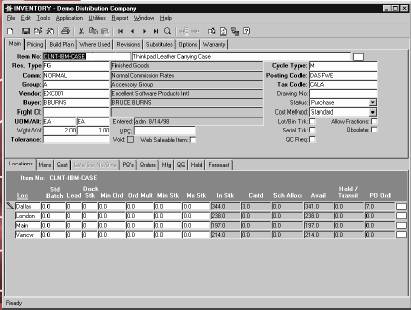
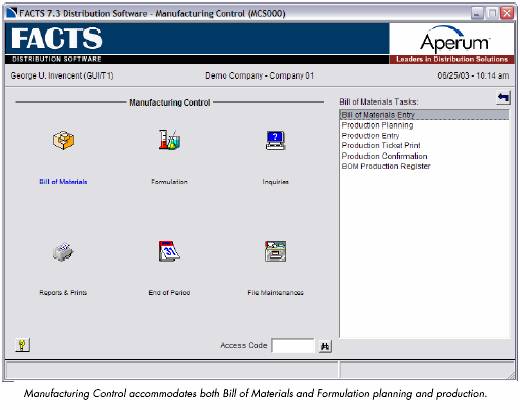
The Facts software includes
modules that manage the bill of materials and formulation, production
planning, automatic general ledger posting, usage / cost change analysis,
BOM and formulation history, bill of materials inquiries, and many related
reports. Inventory is tracked for appropriate restocking, transfers, total
counts, and costing / pricing. Items are categorized as on-hand, on-order,
backordered, and committed quantities. Production tickets are generated
and used by warehouse staff to locate inventory items. The system will
provide a requirements report that analysis cost changes for up to five time
periods based on production planning.
The inventory control module has features that help
to minimize over stocking and increase service levels. It was designed to
utilize the most up to date technologies and methodologies while maintaining a
user-friendly environment. It was designed to continuously capture new
data and use it to dynamically recalculate replenishment controls. The
inventory module also contains a feature that updates the system's prices
electronically with defined external data sources for importing the prices and
product information.
The manufacturing controls support both the BOM
(Bill of Materials) as well as formulation. The system also has options to
automatically distribute and post to the correct General Ledger accounts for a
complete audit trail. The system provides a complete components list along
with the packing requirements, production overhead, labor and cost
analysis.

MAS
500
top
MAS 500
contains many features that provide optimal functionality for a variety of
industries including job costing. Some of the most notable Advanced
Features are listed below:
-
100 character user-defined
account structure
-
Sophisticated and configurable
search engine
-
Multicompany/Intercompany
processing
-
Multicurrency processing
-
Sophisticated inventory
replenishment, including Gordon Graham methodologies
-
Multi-warehouse/multi-bin
support
-
Warehouse, ship-to, requested
date, by line in sales order and purchase order
-
Comprehensive pricing and
costing
-
Physical inventory using cycle
counts
-
Three-step warehouse transfers
-
Automated e-mail distribution
of sales orders, purchase orders and invoices
-
Direct output of query results
to printer or Excel spreadsheet
-
Supports scheduling and
material planning for multiple manufacturing facilities
-
Ability to handle co-products
and multiple parts produced per Work Order
-
Integrated multimedia with
ability to view images, video, and audio files directly
-
Product Configurator generates
new items on the fly as well as configured routings/BOMs based on
user-defined options/values and configuration rules
-
eExecutive provides a
browser snapshot for busy executives
-
Explorer provides
in-depth query tools in a single place
Reporting
-
Crystal Reports 8.0 ships with
System Manager and all standard and business reports are developed with
Crystal. Runtime parameters are provided for all reports allowing users to
define sort and select criteria without modifying source code. Stored
procedures are used to extract report data providing enhanced report
performance. Report source code is delivered allowing easy customization.
-
FRx Desktop V 6.0 ships
with the General Ledger providing a powerful financial reporting
environment. Drill down from a financial report to the accounting
application is supported.
-
Best Office, delivered with
the base application, provides a seamless way for users to easily extract
accounting data to desktop productivity tools such as Word and Excel.
-
Output query results to
a printer or Excel spreadsheet.
Customization
-
Customizer allows end
users to customize existing forms. Customization options include:
modifying existing controls, adding new controls and adding procedural
code using VBScript with access reuses controlled by site, company,
security group or user.
-
Application Framework includes
Visual basic controls, tools, and utilities that together form the
infrastructure on which MAS 500 is built.
-
Source Code is available by
module and provides the ability to extensively customize the MAS 500
product.
-
Application programming
interfaces allow simpler integration to most MAS 500 transactions.
Third Party Integrated Products
-
Warehouse Management
-
Shipping Management
-
EDI
-
Quality Assurance
-
Deferred Revenue
-
Fund Accounting
-
E-Commerce
-
OLAP
-
Fax Integration
-
Credit Card Authorization
-
Sales Tax Integration
NxTrend top
NXTrend's software
market focus has been primarily for the electrical, air conditioning, and
plumbing industries. Their product line, Strategic Exchange (SX),
facilitates the flow and access of information among suppliers,
distributors, and customers. They also offer a wide range of services
including business consulting, product support, and education. They
have been operational for 17 years and they have nearly 800 employees and
eight different company locations.
NxTrend software facilitates
the distribution process through the receiving, order picking, material
handling, and order packing / shipping feedback modules. Shipping and
receiving functions include receiving products against a purchase order,
multiple PO’s, or an Advanced Shipping Notice received via Electronic Data
Interchange (EDI). The system handles backorders and purchase order updates
as well as vendor cross-referencing from hand held data collection devices.
NxTrend can also generate bar code labels and integrates with wireless
terminals. The wireless cycle and physical count are obtained using Radio
Frequency (RF) technology.
The NxTrend utilizes
optimized picking algorithms and cross dock routing for the picking process.
The system also contains kitting and light manufacturing capabilities and
can account for on-line shipping manifest and package tracking systems. The
Total Warehouse Logistics product handles WMS workflow issues including
receiving, product movement, shipping, picking, and counting.
Profit 21
top
Profit 21's
CommerceCenter's offers a high-performance, standards-based application
architecture. It can accommodate evolving customer needs and
technologies as it is highly customizable. It utilizes the Microsoft Windows
2000 platform and SQL Server RDBMS and was designed for small organizations
large enterprises.
-
Customer-Centric Operations
provide the order processing and management tools, coupled with customer
relationship management functionality, necessary to anticipate customer's
needs.
-
Supply Chain Management
offers a powerful range of features that manage procurement, inventory,
and warehouse activities for order-of-magnitude operational improvement.
-
Financial Management
provides a flexible, fully integrated financial suite that adapts to your
specific business rules for optimal financial management.
-
Workflow
automates business tasks, identifies exceptions, and generates alerts,
while eliminating paperwork, cutting costs, and increasing efficiency.
-
Business Reporting and Analysis
features powerful tools that improve decision making by summarizing key
data, identifying trends, and enabling forecasts.
-
System and Data Messaging Utilities
optimize system performance and enable interoperability and connectivity
with trading partners.
-
Electronic Commerce
seamlessly integrates with Trading Partner Connect, Prophet 21's Internet
trading network that streamlines the procurement process between
distributors and their suppliers, facilitates interaction and inventory
visibility among distributors, provides a comprehensive "sell-side"
solution, and enables connectivity to the world's leading end-user focused
vertical marketplaces and exchanges.


SouthWare
top
SouthWare is
generally targeted towards companies with revenues between $2 million to $50
million; however it has the horse power to meet the needs of many companies
with revenue up to $100 million and beyond. To the best of my knowledge,
SouthWare is typically used by companies with 5 to 25 users, but I know for
certain that there are large SouthWare implementations out there with more
than 250 simultaneous users each day. (For example, a SouthWare dealer
who supports large installations of SouthWare is Mark Henry of JFM
Management and his contact information in Chicago is as follows:
mhenry@jfminc.com,
(312) 644-0870. He claims that one of his customers has 300-user
licenses.)
SouthWare runs on your choice of more than 600 combinations of platforms,
operating systems, and databases.
All together,
SouthWare Excellence Series offers 36 separate modules. These modules and
selected key benefits for each module are summarized below.
1. A/R INVOICING ADAPTER -
Maintain detailed invoice histories, supports service codes, returns,
price adjustments, retainage, credit limit checking, unlimited lines of
text on the invoice, miscellaneous charges, added fields, invoice notes,
and end of day sales register.
2. ACCOUNTS PAYABLE -
Maintains 5 years of history for each vendor, supports multiple discounts,
one-time vendors, payments on hold, customer refunds, check voiding, 1099
forms, and recurring transactions.
3. ACCOUNTS RECEIVABLE -
Maintain 5 years of history for each customer, supports customer notes,
invoice notes, added fields, multiple bill-to and ship-to addresses, open
item or balance forward invoicing, commissions based on profit, automatic
late fees, reprinting of invoices and vendor refunds.
4. AcuODBC VISION DRIVER &
AcuXFD TECHNOLOGY - ODBC Connectivity provides the ability to export
data to ODBC compliant applications such as Microsoft Excel.
5. ASSEMBLY WORK ORDERS -
Component features include tracking number, multi-location, conversion
U/M, Fixed or Variable quantity, Confirmation option, W/O Effective Date;
Up to 9999 components per assembly ; creates a stock item from multiple
stock items - components can be sub-assembled for multi-level assembly.
6. CASH FLOW -
Reconciliation report; unlimited number of bank accounts; check number
audit report.
7. COLLECTIONS ADAPTER -
Manage collections by scheduling collection calls and entering collection
call information. Supports automatic selection of customers who need a
call, review previous calls, record who you talked to and what they
promised, call date and promised date tracking, and zoom into the details
of any invoice.
8. CONTACT MANAGEMENT -
Contract assigned to service location, territory, and route sequence;
handles contracts based on meter usage; create proposals / turn into
contracts; generate scheduled service orders.
9. DATABASE DIRECTOR™ -
Store or replicate your data in MS-SQL, Oracle, Informix, ISAM, Microsoft
SQL Server, Oracle and Sybase (for history files), Btrieve, C-ISAM,
generic ODBC.
10. DocTransfer™ -
Directly exchange documents with customers and vendors who also use the
SouthWare Excellence Series™. Exchange EDI documents with customers and
vendors.
11. EQUIPMENT SERVICING -
Track by serial #, tag #, or system; specific warranty dates based on
model; loan, rent, out-of-service indicator; up to 10 schedules per
equipment model; based on time elapsed or metered usage.
12. EXCELREPORT™ - The
ExcelReport allows you to produce a report card summarizing six success
factors; trend analysis, GPA analysis using an A-B-C-D-E-F grading scale.
13. EXECUMATE II™ -
ExecuMate provides a window into the financial health and activity of your
business and includes a summary of the following data: company totals or
profit center detail; cash and aging totals; trigger “Alert” warnings;
financial statement totals current balance; cash worksheet; last 10 weeks
actual cash flows; next 10 weeks projected cash flows; actual trends; A/R
and A/P aging; today’s sales; activity statistics per day, week, month,
etc.; trigger “Alerts” for G/L accounts or financial ratios.
14. EXTENDED DATA™ -
Add hundreds of new data fields to standard files. Create your own prompts
and defaults, add new search keys.
15. FIXED ASSETS -
Tracking, valuing, and depreciating your assets. Supports 15 character
asset ID numbers, property tax report locations, cost basis, salvage
values, replace costs, insurance coverage amounts, usage, owned, leased,
or borrowed indicators, straight-line, declining balance, usage-based,
sum-of-the-years digits, statutory, ACE, and non-depreciable, and partial
period conventions.
16. GENERAL LEDGER - 16
column reporting, source and use of funds report, cash flow in compliance
with FASB 95, multi-company consolidation, 4 segment account numbers, 5
year comparisons, and on-screen zoom to detailed transactions.
17. IMPORTMATE II™ -
ImportMate II is an add-on module you can use to automatically input data
into selected Excellence Series files. ImportMate II prompts you for all
the information it needs and checks to make sure that the data you are
bringing in is valid.
18. INTERNATIONAL
TRANSACTIONS™ - Record, track, and report multi-currency transactions
involving international trading partners. Features include unrecognized
gain/loss report, history of gain/loss report toggle display between
natural currency and base currency (dollars)
19. INVENTORY CONTROL -
Comprehensive line of modules for your inventory-related operations.
Sophisticated Inventory Control includes tracking numbers
(serial/lot/etc.), various costing methods, multi-location flexibility and
many related capabilities to help you manage inventory levels and
information. Purchasing features help you buy what you need, when you need
it, and at the right price. You can track the assembly of items from
inventory, returns to vendors and returns from customers. Sales options
include Point of Sale, Order Entry (and related shipping processes) and
Rentals. Plus, powerful management tools ensure that you always know where
you stand in reaching your goals for profitability and service.
20. JOB COST- Completed
contract or percentage complete; copy function to quickly duplicate a job;
AIA Invoicing option; subcontractor retainage; change order; overhead
allocation; and up to four breakdowns such as phase and cost category.
21. ORDER ENTRY -
Customize the keystrokes and security features per operator ; text and
notes for the order ; special purchase, drop ship, and handle as surplus;
backorder, substitute and cancel options; sell from multiple locations on
an invoice.
22. PAYROLL -
Distribute salary to multiple G/L accounts ; employee notes; added fields;
pre-check authorization report; direct deposit; retirement, review, leave
reports; 401-K, cafeteria plans, and garnishments.
23. POINT OF SALE -
Numerous pricing options; serial, lot, or other tracking numbers; option
to display suggested related items; allows miscellaneous add-on charges;
calculates proper sales tax; any combination of cash, check, credit card,
or on account payment; calculates change due; optional interface to
electronic cash drawer.
24. PURCHASING -
Suggested order quantity based on EOQ, movement class, quantity discounts,
prior usage, min/max; safety stock - fixed or based on usage; option to
“freeze” order controls for items; Info about out of stock situations;
seasonal indicator and movement class generates POs for stock based on
current item status and order controls replenishment, expedite,
exceptions, review cycle, scheduled receipts, vendor performance, and
other reports.
25. RENTAL DEPARTMENT -
Ideal solution for the business that both rents and sells items;
multi-location option, base rate for rental table, serial number tracking
option, Cost/Value/Price info; other info such as bin location, turnaround
requirements; rentals, sales, and service in single transaction; option to
sell or exchange rental items; grace period, cutoff times and weekend
pricing; security deposits.
26. REPORTMATE™ -
Access the data in any major file in SouthWare and produce a report.
Relationships between files are already set up; test a field to be less
than, greater than, equal to, not equal to, greater than or equal to, less
than or equal to, or match on masking characters ; report formats include
printer, screen, or file, HTML file, browser table, DIF, delimited, merge
file, XML data, fixed-position or fixed-length text, a file to use with
ImportMate, as ExecuMate II statistics; “WYSIWYG” entry lets you see and
edit what the report will look like, up to 264 columns per line
27. RETURN AUTHORIZATIONS -
Lets you manage your inventory in conjunction with items being
returned from customers and items being returned to vendors; Tracks
item/serial#/equipment info; estimated cost; return status info.
28. SALESMARK® -
Integrated contact management system 36 user-defined record types;
multi-screens per record; up to 10 search fields per record; client data
linked to A/R customer; territory masking; conversation records; hot keys;
history of letters, literature; mailing lists and labels ; automatic phone
dialing; data import to create prospect records from purchased databases;
create selective call campaigns.
29.
SALES PROCESSING - Provides sales quotes, user friendly POS, order
entry, order acknowledgements, credit card verification, special pricing,
sales tax, commission calculation, partial or full invoicing that includes
backorder capabilities, and delivery scheduling.
30. SERVICE INVOICING -
System for service businesses that handles credits, special orders,
pricing adjustments, and payments on account credit limit checking;
generate invoices from contracts, service orders, equipment service
pricing.
31. SERVICE ORDERS -
Option for multiple service locations problem description, problem codes,
estimates, comments, and actions taken, track dates and times for each
step; option to service multiple equipment on one service order, multiple
technicians per service order; display service orders to be dispatched
along with a list of possible technicians; check technician skills,
territory, priority.
32. SHIPPING INTERFACE -
Send order-related information to and from a third-party shipping software
package; interface to/from StarShip™ (by V-Technologies); interface
to/from Clippership™ (distributed by Evcor); open interface can be
utilized by other shipping software that supports ASCII file
transfer/polling.
33. SOUTHWARE NETLINK™ -
Provide partners controlled browser-based access via the Internet to
review and update your business data. Valid requestor logins; security
masking per requestor and request.
34. SOUTHWARE THIN CLIENT-
Provides graphic interface via UNIX or LINUX servers. Faster and
easier to set up and administer. Performs faster, even on slower computer
workstations. Results in tighter security. Reduces network traffic.
Reduces total cost of the system.
35. SOUTHWARE WORKFLOW™ -
Create customized program changes for your needs while remaining
compatible with the standard version.
36. SWIFTMATE™ -
SwiftMate is SouthWare's system manager module which allows users to
configure menus, security, styles, hardware, etc. SwiftMate keeps track of
who's logged into the system and what they are doing. It can send e-mails
between users. SwiftMate enables you to program new features with Objects,
Field-Level Objects, and Field Filters. You can also create "Zoom Views"
to provide unique summaries of your data.
37. TASKWISE® -
Combines the functions of task management, relationship management,
exception management, and information sharing into a single company-wide
system. Tracks contacts, opportunities, prospects, alerts, financial
graphs, trends, tasks, etc.
TakeStock top
TakeStock offers robust
functionality as a new system or as an integrated system with other
software. It was designed using a modular based design that can be modified
as business needs and technology changes. It contains eight core modules
and fifteen add-on modules so it can be tailored to fit the needs of the
business. The core modules include:
-
Sales Orders – tools
to manage the entire sales order process.
-
Inventory Management
– optimizes the inventory process as well as customer service.
-
Purchase Orders –
automates the purchasing process including suggested PO’s, inventory
replenishment, inventory transfers, and backorder fulfillment.
-
Sales Analysis –
monitors sales performance.
-
Accounts Receivable
– manages receivables processes including payment items, credit card
limits, payment history, customer inquiry, and sales order detail.
-
Accounts Payable –
manages payment terms and discounts, generates checks and maintains vendor
history.
-
General Ledger –
provides all standard features that should be included in the General
Ledger processes.
-
System Management –
allows menus to be customized, provides centralized notes, flexible
security settings, and management alerts.

Management Alert messages
send messages that need immediate attention to management.
TakeStock has add-on modules
that can provide a more specialized approach to the distribution system
include:
top
|