


Unique Aspects of the Distribution Industry
"We've Done the Homework for you!"


Distribution software must not only perform accounting processes, but must also have capabilities to track inventory and process shipments.  The interfaces must be easily learned and integrate with the warehousing system.  The reports that are used by shipping personnel and transport unit personnel should be straight forward so that a person who is unfamiliar with the system can still read information about the shipment.  A system that lacks key features will not only hinder delivery time and productivity levels of personnel, it may redirect customers to rival businesses that deploy more efficient systems.

In order to maintain a competitive status in the distribution market, it is essential to provide a system that functions proficiently for your staff.

Key Features of Distribution Software

When it comes to distribution software, you can drive yourself crazy trying to wade through the diverse features, technologies and rhetoric that you will encounter during a search for the right solution. Just about every product on the market today claims to have distribution capabilities.  We encourage you to dig a little deeper and start your evaluation by concentrating on the following key features: 

Vertical Industries It is important to realize that there are many different distribution industries out there, each with their own unique needs and way of doing things. Most distribution solutions are designed specifically for one or more of these industries, but there is no one package that excels in all of these areas. Start your evaluation by studying the industries (and SIC codes) below, and make sure that the distribution accounting systems you are evaluating offer a solution and references in your particular industry. Most distribution systems  promote their product as being best suited for one of these industries:  

Plumbing and Heating PVF  5074
Electrical 5063
HVAC 4961
Industrial 3613
Fasteners 5072
Medical Supplies 5047
Chemical 5169
Food Service Equipment 5046

Order Entry

The best place to start your evaluation of distribution solutions is in Order Entry.  If the person handling the order can't easily get to all the information they need, nothing else matters.  Here is an example of an order entry system that ties it all together - order replenishment, stock reservations, and suggested purchase orders where needed. 

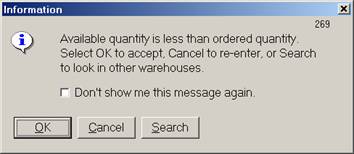
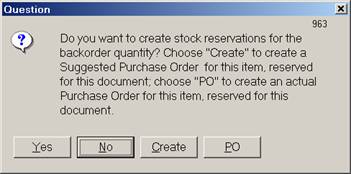
In TakeStock, from Aperum, all of this information was automatically generated when units ordered  exceeded available inventory. The order entry clerk did not have to think or run a procedure or even print a report to make all of this happen. 

I entered an order for 100 items.  The following dialog was triggered by lack of inventory on hand:


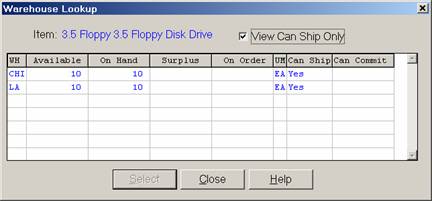
My first option was to search other warehouses.


When I selected 10 units from other locations, I was still unable to complete this order. 

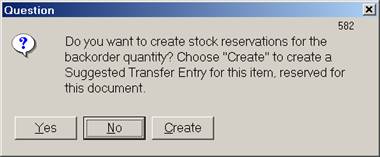
So my next option was to reserve stock from outstanding purchase orders  or to create a transfer entry for the goods. 


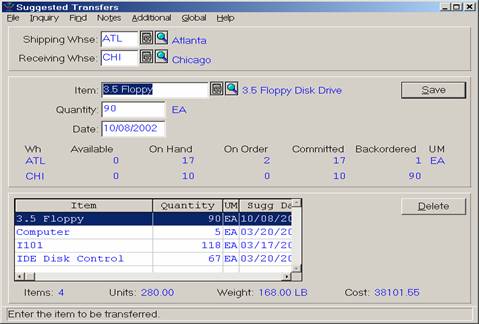
 Here is the transfer entry that was created by the system :


Now I need to create a purchase order for the goods going to the Chicago warehouse.  Again, I am automatically prompted to create this document.

Even if your order entry clerk is watching Oprah on TV, reading a book, and chewing gum while keying in this order, he or she will be unable to miss the steps needed.  

Pricing Options

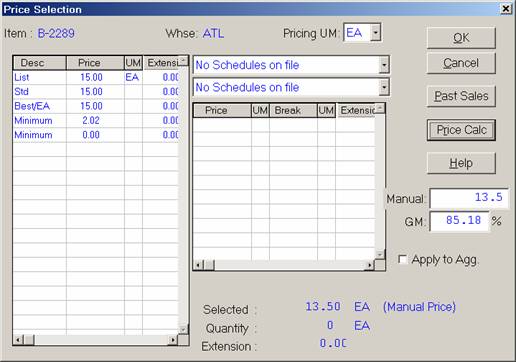
In some environments, the order entry clerk is given control over pricing decisions when entering a quote or an order.  They should be able to select from pre-defined pricing schedules, or to calculate special prices based on margins they enter.  In this case, there should be controls in place that prevent items from being sold for too little margin.  TakeStock, a distribution solution from Software Solutions, Inc does a nice job of providing multiple pricing options.  

TakeStock pricing screen 

This pricing screen is visible at Order Entry - note the option to enter a manual price or Gross Margin.

In addition, this system checks the minimum/maximum gross margins in three places.  You can set gross margins by item, by vendor and product line, and for individual sales documents.

Other Important Features

Once the orders have been entered, there are four main areas that need to be addressed in a distribution solution - procurement, inventory management, warehouse management and logistics.  

Procurement issues 

Vendor management, lead/delivery times, item substitutions, returns management 

**Eclipse has a solution called Product Data Warehouse that stores vendor catalogs in a separate database.   The database can be searched when a non-stocked item is encountered on an order and the item can be added to inventory.

Usage Based Procurement - use historical data to predict future inventory usage. The requisition feature allows you to automatically create purchase orders based on reorder requirements.

Inventory/warehouse management

Non-stock items, max/min reorder quantities

Physical counts, order management, inventory management, purchasing and sales analysis– critical elements of inventory control and turnover levels.

Picking :

  • Pick by order -- Select the individual items needed to complete an order - this involves small quantities per order and rush delivery.  This is the least efficient way to pick items for delivery.  

  • Batch picking -- An employee would pick the items for all orders in the sequence in which they are stored in the warehouse. These items would then be delivered to the shipment area for packing and shipping.

  • Zone picking -- Picking specific items for multiple orders within an item category or warehouse location. Multiple employees pick merchandise for order completion. These employees would bring these items back to the staging area to be sorted and assembled by order for packing and shipping.

Once the items are picked - inventory needs to reflect the removal of these items.

  • Bar-coding 

  • Serial number 

  • Lot tracking

  • RF devices - should have integration capabilities

  • Item Conversion - should be able to convert units from purchased quantity - inventory quantity - to shipping quantity

Packing

Cross-docking - receive the goods and immediately ship to the customer - no shelf time for items - requires close coordination between producer and distributor

Logistics

EDI /XML

Drop shipping

Returns Management

Multi-bin./Multi-location tracking

Item Substitution

Item Cross-Reference

Contract Pricing 

Special Issues :

  • Seasonal Businesses 

  • Container Management

Customer Care

A distribution company has most of their money tied up in inventory.  Their challenge is to keep the smallest amount of inventory on hand while providing the shortest turn around time for order fulfillment.  The internet has really shined the spotlight on distribution systems as speed and accuracy of order fulfillment have become the main difference between winners and losers in e-commerce transactions. 

- END -


Would you like some more help? 

Click here


The Accounting Software Advisor web site features
the world’s most comprehensive review of the top accounting software solutions.
Go to our
HOMEPAGE


[pagefooter.htm]